Case Study: processing of a novel motor-bound nucleosome state (EMPIAR-10739) - part 2

Processing EMPIAR-10739 including using 3DVA to guide classification strategies, separating low population classes, and local refinement of a flexible region.

Part 2 of our case study on EMPIAR-10739 (Sections 12-16 shown in the flowchart below) explore the processing of a newly discovered minor population state. If you are following along with the processing steps, you will need to first complete Sections 1-8arrow-up-right from the main case study.

Many of the following processing steps were repeated multiple times, and with minor modifications from the preprint, to ensure reproducibility, and so note that particle numbers and resolutions may vary subtly. Image processing steps in this case study were performed using CryoSPARC v4.7.1.

Flowchart showing the CryoSPARC jobs used in each section of this case study.
circle-info

We repeated Classifications 1 & 2 four times each to check for reproducibility - we found that Classification 1 consistently produced 1-2 volumes; and Classification 2 consistently produced a single volume; that have ALC1 in the active state that is processed in sections 8-11. These classes contained some variation in particle number, and the total particles carried forward to NU Refine 4A-C were 95.6-115k particles.

Section 12: 3D Classification of a new state

In 3D Classification 1 we found one class that had strong density for well-ordered ALC1 that is tightly bound to the nucleosome. This was clearly visible at a contour threshold of 2 and which is considered the active state (Bacic, Gaullier et alarrow-up-right). At a lower threshold of 1, we found a second interesting-looking class volume formed of 22k particles, that contains a density that appears to have relatively few contact points with the nucleosome, except to the acidic patch of histones H2A and H2B (see Figure 19 A). For the purpose of describing the following processing steps, we will refer to this as a loose binding state of ALC1.

circle-info

We did not find a similar volume in Classification 2 despite repeated runs. However, considering the biochemistry of the target, we expect this binding conformation to be present on both faces of the nucleosome. We considered that the mask used to classify in Classifications 1 & 2 may not be optimal for finding this new state.

  • Inspect the volumes from Classification 1, and look for a volume that is similar to the ones shown in Figure 19. Note that it is possible to have more than one volume that resembles this state. You only need to run 3D Classifications 1 & 2 once, but we show four examples on Figure 19 for illustrative purpose only, to give a sense of the variation in this volume that you might observe.

    Figure 19. Mask design for Classification 3. A) Example volumes from 4 replicate runs of classification 1. B) Example difference volumes between the identified loose class and the consensus volume. C) Four examples of Mask 6 created from each replicate shown at a contour threshold of 1 and 0.005 compared to the consensus volume (grey).

We are interested in classifying the region of additional density that is present in the loose class, but that is not present in the consensus map. We can make a difference map that contains just this density by subtracting one volume from another. This could be achieved using the ChimeraX volume subtract command, as we did in section 8, but this time, we will instead generate a difference map using CryoSPARC directly.

  • Run Align 3D Mapsarrow-up-right 1, inputting the loose class map from 3D Classification 1 as the “Reference map” and the Consensus map from 3D Classification 1 as the “Map to align”. The job will then align and subtract the consensus volume from the loose class volume.

As well as performing the alignment of maps, the job Align 3D Mapsarrow-up-right also outputs a difference map as a lower-level output, and this can be found in the Outputs tab of the job card once the job is complete (see Figure 20).

  • Download and inspect the difference map to ascertain a threshold where there are no small blobs of density outside of the main large density. We found a threshold of 0.8-1 to look good.

  • Create a Volume Tools job, inputting the Reference Volume from Align 3D Maps 1, and drag over the lower level slot for map_difference. This process exchanges the original volume with the difference map volume. Figure 20 shows how to achieve this using the CryoSPARC job builder. For further information about lower level results please see this page on the CryoSPARC guidearrow-up-right.

    Figure 20. CryoSPARC job building steps to use a difference map.
  • Use the following setting to generate Mask 6

Parameter
Setting
Explanation

Type of output volume

mask

Theshold

Threshold where no small blobs appear outside the main density

Dilation radius (pix)

1

Extend for a little more coverage

Soft padding width (pix)

3

Soft edge to avoid masking artefacts

The input map from Classification 1 is Fourier cropped to a box of 56, which has a pixel size of 6.24 so note that this time we don’t need to lowpass filter the map before we make a mask because it is already Nyquist limited to ~12.5 Å. We also need to use relatively few pixels for Dilation and Soft padding to cover the region in Å that we want.

  • Compare Mask 6 to Mask 2.

We already identified particles with ALC1 in the active state from Classifications 1 and 2, so we can exclude those from the set so that downstream from here, we are only considering particles here that have not already been assigned a known class type.

  • Run Particle Sets Tool 2, inputting the particles from NU Refine 3 into “Particles (A)” and input all of the class particles that show the tight-bound ALC1 from Classifications 1 & 2 into “Particles (B)”.

circle-info

For difficult classifications cases, focus masks may need to be iteratively designed as class density improves, until a good classification is observed. We found the mask shape of Mask 6, and the downstream classification result at this stage to be variable in different runs, due inherent random behaviour during classification.

  • Clone 3D Classification 1, exchange the input particles for A_minus_B from Particle Sets Tool 2, and exchange the mask for Mask 6. This is 3D Classification 3.

Parameter

Setting

Explanation

Number of classes

40

Using more classes can help separate low population classes

Filter resolution (A)

5

A resolution that will allow us to see more structural detail

Initialization mode

PCA

We found PCA initial volumes gave us a more reproducible result than using simple mode

Class similarity

0.1

When looking for density presence/absence, the classes should not be very similar

O-EM batch size

300

Using a smaller batch size means more iterations, and more volume evolution

O-EM learning rate

0.9

We want the volumes to evolve fast from the start

Number of particles to classify

400000

A subset of the whole stack in order to speed up the job

circle-info

We found empirically that 400k particles gave a consistent enough result, and this sped up the job from ~3hr to ~1hr and so we included this information, but during a typical exploratory pipeline it may make more sense to use the whole particle set, and evaluate if the results are good enough.

Once the job is complete, inspect the output volumes. You might have one or two volumes that are similar to the loose state that we saw in Classification 1. The resulting map now contains more features than the one from Classification 1, due partly to the higher Filter resolution used in Classification 3. We show example map density in Figure 21B.

circle-info

Now that we have a better idea what shape the density is for this class, we can design a better mask for classification of all the particles. We tried a few different masks at this stage, and compared the quality of downstream refinements. The final results were fairly similar and so the precise masking at this stage may not be crucial as long as the overall region covered is similar to that shown for Mask 7 in Figure 21.

  • Run Align 3D Maps 2, inputting a loose state from Classification 3 as the ‘Reference map” and the Consensus map from Classification 1 as the “map to align”.

  • Download and inspect the difference map to ascertain a threshold to set where there are no small blobs of density outside of the main large density. We found a threshold of 0.15-0.22 to look good.

  • Create a Volume Tools job, inputting the Reference Volume from Align 3D Maps 2, and drag over the lower level slot for map_difference, as shown in Figure 20.

Parameter
Setting
Explanation

Type of output volume

mask

Lowpass Filter (A)

15

Filter to remove high resolution features

Theshold

Threshold where no small blobs appear outside the main density

Dilation radius (pix)

2

Extend for a little more coverage

Soft padding width (pix)

5

Soft edge to avoid masking artefacts

This time around, the input map from Classification 3 is Fourier cropped to a box of 144, which has a pixel size of 2.43 so we do want to lowpass filter to remove higher resolution features, and we need to use more pixels for Dilation and Soft padding that we did for Mask 6. This mask will be Mask 7.

circle-info

Recall that this nucleosome is pseudosymmetric, and so it could have this type of interaction on both faces. We can rotate the mask to allow us to perform classification on the opposite side. We do this rather than symmetry expanding and classifying on one side for two reasons 1) we might want the option to check that the density looks the same on both sides 2) the classifications on each side can be performed in parallel, but the symmetry expanded classification is a single job that takes twice as long, so as long as there are 2 GPUs available, it is more time-efficient to perform one classification on each side.

  • Run a Volume Alignment Toolsarrow-up-right job inputting the volume from NU Refinement 3 and Mask 7. Set 3D rotation euler angles (deg or rad) 0,0,180, and the output mask is Mask 8.

  • Compare Masks 2, 6 and 7 (examples shown in Figure 21A) to see how the shape iteratively changed.

    Figure 21. Comparison of masks and output volumes from classifications 1, 3 and 4. Mask are shown at a contour threshold of 0.5 relative to the map from Refinement 3.
  • Clone 3D Classification 3, exchange the focus mask for Mask 7 and remove the value in Number of particles to classify. This is 3D Classification 4.

  • Clone 3D Classification 4, and exchange the focus mask for Mask 8, and this is 3D Classification 5.

  • Inspect the maps from Classifications 4 and 5, and identify the loose state volumes that are similar to the volume in Figure 21B (right, blue). In total you might find two or three classes in total that resemble this state.

Section 13: Non-Uniform Refinement and 3DVA of the loose ALC1 state

Now that we have selected the loose state classes (and their particles), we want to look for finer details of the additional density than we can see in the 3D Classes. To do so we will start with Non-Uniform Refinement. We could separately refine the particles from Classification 4, and Classification 5 to retain the DNA asymmetry, but to help us get better density quality for the additional density, we will instead combine the particles and refine them together with C1 symmetry, allowing the asymmetry from the additional density to dominate particle alignment, at a cost of losing the information about the DNA asymmetry.

  • Run a Non-Uniform Refinement (NU Refinement 6) with Minimise over per-particle scale:true and Dynamic mask start resolution (A): 1, input a loose-class volume from 3D Classification 4, and the loose class particles from 3D Classifications 4 & 5.

Inspect the output volume from Refinement 6 and compare to the example density shown in Figure 22. By using Model Angeloarrow-up-right, we found the density was sufficiently well-ordered to allow identification of the additional density contacting the acidic patch as a part of ALC1.

Figure 22. Map and features from the Refinement 6 map. Left; map at a high contour threshold coloured by proximity to the nucleosome (grey), acidic patch residues (teal) and ALC1 (pink). Right; map at a lower contour threshold shown relative to a gaussian filtered version of the Refinement 3 map in semi-transparent white.
circle-info

Whenever you observe new, unknown density during data processing, it can be helpful to compare this density to existing PDB models or maps of the target in different states that do not show this density. For example, to aid assessment here, you can compare the maps from Refinements 6 and 3, and/or fit in a nucleosome PDB such as 7otqarrow-up-right. As we are writing this case study after depositing a model, we had the option to fit in PDB 9tv4arrow-up-right to the map from Refinement 6, and colour it according to proximity to the nucleosome (grey), acidic patch residues (teal) and additional density (purple) in Figure 22. We found that the density was pretty good for the core nucleosome, and found a region of well-ordered density binding to the acidic surface patch formed by histone H2A and H2B. Although the map quality might vary somewhat between classification runs, in Bridges et al.arrow-up-right, we were able to identify that this pink density region originated from ALC1 by providing to Model Angeloarrow-up-right a sharpened map and sequences of the known components that were in the preparation (Nucleosomal DNA, histones H3, H4, H2A and H2B, HPF1, PARP1 and ALC1).

The Global FSC resolution in our hands was around 2.8 Å, but the region that we are most interested in (pink density in Figure 22) is largely fragmented, featureless and appears only at relatively low contour threshold. This tells us that there must be residual heterogeneity in this particle stack, and so we will now go on to analyse the particles by 3D Variability Analysis. 3DVA is perfect for this scenario because it should be able to give us clues about the type of heterogeneity that is present, and how we might approach the next processing steps.

For 3DVA, only variability within the masked region is considered, and so we want to try and ensure that the mask is large enough! We already have Mask 7 that covers the loosely-bound ALC1, but to be on the safe side we will expand it a bit further.

  • Clone the Volume Tools job that made Mask 7, change the Dilation radius (pix) to 5 to produce Mask 9.

  • Run a 3D Variability job (3DVA 2), with a Filter Resolution (A) of 12 and inputting the particles from Refinement 6, and Mask 9.

  • Use the quick action to create a 3D Variability Display job, and set Downsample to box size: 128, so that the resulting maps are a smaller size to download.

  • Download the series and open them in ChimeraX

We show an example movie showing the three modes that we found in Movie 2.

Movie 2. Modes from 3DVA 2.

We found that there was complex heterogeneity present. The most prominent features were a rotation (see Figure 23A), and the presence and absence of a tube of density that runs along a DNA super-groove that is formed by the alignment of two major, or two minor groves in the nucleosome DNA (see Figure 23B). The most distal ALC1 density appears to also have a high degree of heterogeneity in our mode 3.

We ran this procedure a few times to check for consistency and found that replicates generated volumes with tubular density in one, or two super-groove locations. Where it appears in two different location, one is a major super-groove, and the other is a minor super-groove (see Figure 23B). You might only see it in one location overall, you might see it in both locations in a single mode, or, as in the example in Movie 2, you might see it in different super-grooves in different modes.

Figure 23. Key features of 3VA volumes. A) Top view of two selected volumes, showing the rotation of ALC1 relative the nucleosome, and a diagram approximating of the extent of rotation. B) Side view of two selected volumes showing the tubular density occupying either major (blue) or minor (pink) super-groove, with these regions indicated relative to a surface representation of PDBN 7enn.
circle-info

When you observe the appearance and disappearance of density in a mode of 3DVA, this usually indicates the presence of discrete heterogeneity, either conformational, or compositional. This is a clue that we might benefit from classifying into discrete states, for example by using 3D Classification, or 3DVA cluster mod

We noted that the appearance of the tubular density appeared to correlate with the rotation extent of the ALC1, and so it seems possible that the tubular density originated from the same part of ALC1, but that it has at least two different interaction sites with the DNA.

Section 14. Mask design and sub-classification of the loose ALC1

Having established in Section 13 that we likely have discrete heterogeneity present, we want to go ahead and try 3D Classification. As the motion of the ALC1 rotation, and the groove-selection may or may not be coupled, we could either classify with a focus mask over the ALC1 density closest to the nucleosome (we refer to this region as proximal), or we could use a mask over the region of tubular densities. In exploratory processing, you often need to try a variety of approaches in order to find the best route. Here, we will try classifying on both regions, and see which one gives the best classification!

The choice of volumes(s) to use for the next step depends on the appearance of your 3DVA volumes.

A) If you obtained volumes from 3DVA 2 that resemble both the pink and blue volumes in Figure 22

  • open them up on ChimeraX and sum the volumes with the following command, where X an Y are the model numbers for these volumes:

  • Save, upload and import this volume to CryoSPARC.

B) If you only obtained a volume that resembles one or other of the two states in Figure 23

  • open the volume from 3DVA 2 with the best tubular density

For the tubular density region, in ChimeraX using either the summed volume or the single frame volume produced above, use the map eraser tool to erase most of the density, leaving just the volume for the tubular region show in Figure 24A and apply a gaussian filter. Save this volume and take a note of the contour threshold that looks suitable for mask binarisation.

  • Save, upload and import this volume to CryoSPARC.

For the proximal density, use the map eraser on the same input volume as above, and erase everything except the proximal ALC1 density, so that it resembles that shown in Figure 24 B, apply a gaussian filter, save the file, and make a note of the threshold

  • Save, upload and import this volume to CryoSPARC.

We want to generate a solvent mask, and two focus masks - the solvent mask should be large enough to contain both of the focus masks.

  • Create a Volume Tools job inputting either the summed volume (A) from above, or the volume from Split Volume Groups (B) that has the best tubular density and use the following settings to generate Mask 10

Parameter
Setting
Explanation

Type of output volume

mask

Theshold

Threshold where no small blobs appear outside the main density

Dilation radius (pix)

5

Extend for a little more coverage

Soft padding width (pix)

5

Soft edge to avoid masking artefacts

  • Create one Volume Tools job for each of the two erased volumes that you imported, and use the same settings as for mask 10, but use Dilation radius (pix) 4 to make the mask slightly tighter to the volume than the solvent mask. This will produce masks 11 and 12.

Examples of summed volume and erased volumes, along with their respective Masks 10-12 are shown in Figure 24.

Figure 24. Volumes used to generate masks 10-12, and mask density. Erased density and masks are shown relative to the summed volume (in grey), and masks are shown at a contour threshold of 0.99.
  • Create a new 3D Classification job using the particles from NU Refinement 6, Mask 10 as the solvent mask, and Mask 11 as the focus mask. Use the following settings for Classification 6:

Parameter

Setting

Explanation

Number of classes

3

One for each of the tube density locations and one spare

Filter resolution (A)

7

A resolution that will allow us to see the features

Initialization mode

PCA

We found PCA initial volumes gave us a more reproducible result than using simple mode

O-EM batch size

100

Using a smaller batch size means more iterations, and more volume evolution

O-EM learning rate

1

We want the volumes to evolve fast from the start

  • Clone Classification 6, and exchange the focus mask for Mask 12. Run this job as Classification 7.

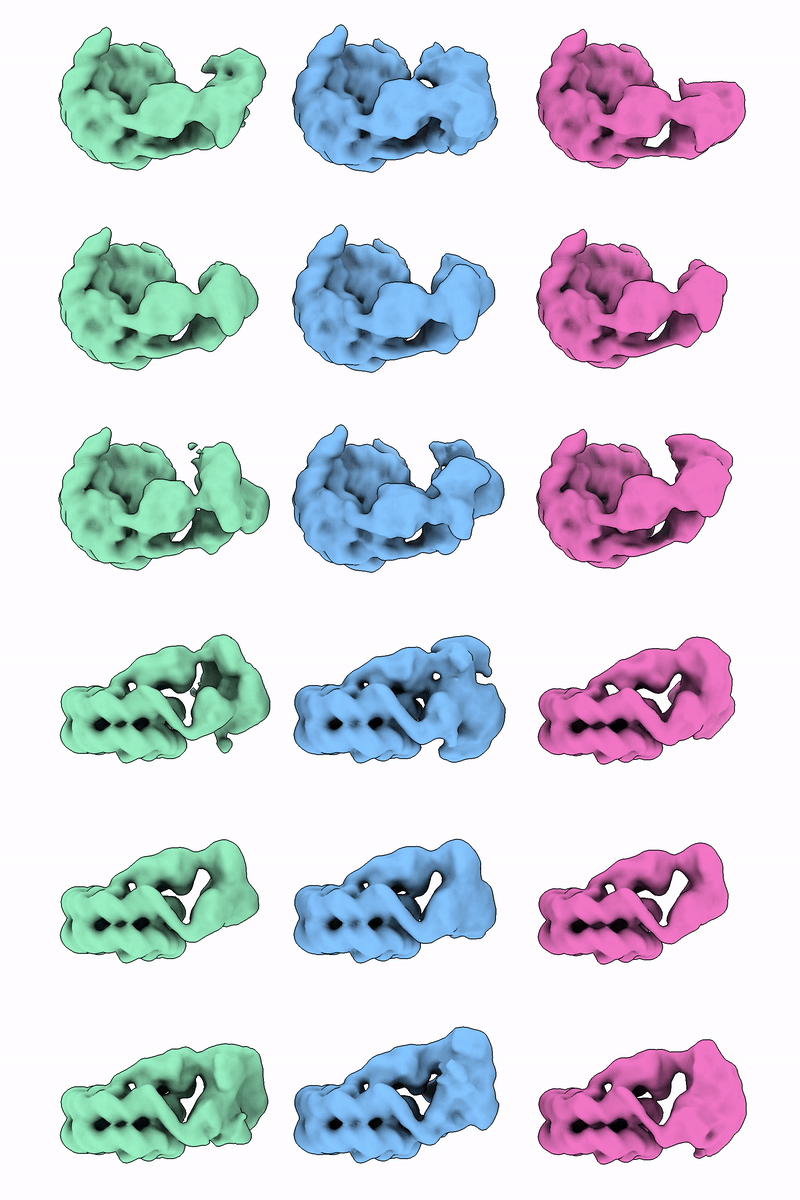
When both jobs are complete, examine the volumes. We show example volumes from Classifications 6 and 7 in Figure 25. We ran Classifications 6-7 as 4 replicates, to see how consistent the output volumes were. We found that classification 6 gave less ambiguous classes than Classification 7, and was able to separate out one class with good density for what looks like a long helix interacting with a super-groove (Figure 25, pink) that we will call loose state A, the other two classes tended to have either no density for this helix, or weak density interacting with the adjacent super-groove (Figure 25, blue) that we will call loose state B. This blue state was less consistent in quality between replicates. Classification 7, on the other hand, produced volumes with ambiguous density for the tubular region, despite separating rotation states of the proximal density region. This results seems to indicate that the two regions we classified, are not entirely coupled in their motions.

circle-info

If your classification does not contain loose state B, and you are interested in processing it further, you can try i) re-running 3D Classification 6 perhaps with a slightly adjusting the focus mask or ii) repeat Classifications 4-6 to find this class due to stochastic events during classification.

Figure 25. Example density from Classifications 6 & 7. Volumes are coloured according to the state that they represent, with green volumes showing ambiguous density.

Every time that we performed replicates of classification 6, we found loose state A (pink), and we sometimes also found loose state B (blue). We have separated some interesting states, but the classification was tricky and not fully reproducible. When situations like this arise it can be a good idea to try 3D Variability Analysis to see if there is residual heterogeneity present.

  • Run a Homogeneous Reconstruct Only job inputting the particles from the class that matches our Loose state A (pink) above and examine the map

Recall that the particles at this stage were aligned during NU Refinement 6, so the alignment is dominated by the strong signal from the nucleosome. We found that the reconstructed map looked pretty similar to Refinement 6, with the nucleosome density being well-defined, but most of the ALC1 appearing as fragmented density. This indicates residual heterogeneity in the ALC1 part of the map.

Section 15. 3DVA and Local Refinement of the loose state

As we suspect heterogeneity in our Loose state A particles, 3DVA is often a good first port of call!

  • Run a 3D Variability Analysis job, inputting the mask from Classification 6, and particles from the class that matches our Loose state A (pink) above, and set the Filter resolution (A) to 12.

  • Use quick actions to build a 3DV Display job in simple mode with the following settings:

Parameter

Setting

Explanation

Downsample to box size

128

Fourier crop the volumes so the file sizes are smaller

Crop to size (after downsample)

100

Crop the box so that it is closer to the particle to make the file size smaller

Filter resolution (A)

12

Filter the maps for a smoother appearance

  • Examine the output series using ChimeraX

Movie 3. 3DV Display volumes from modes 2,1 and 0.

We show example movies for the three series in Movie 3 where we can see that even when there is helical density in a fixed location, the rest of the ALC1 undergoes additional conformational changes. We see in our series 0 (pink, right) that the proximal density is still rotating around the nucleosome while the helix is in place, therefore from this movie, and the result from Classification 7, we can postulate that the rotation position of the proximal ALC1 density might not be directly coupled to the helix binding in this location. In addition, in our series 1 (middle, blue) we see the proximal density levering up and down, pivoting at the same contact point as series 1.

circle-info

Where heterogeneity is complex and multidimensional, it can be challenging to decide the route ahead. When there are plenty of particles, it can be beneficial to run hierarchical classifications, or parallel classifications on different regions and take particle intersections. Particle number can become limiting though leading to refined or reconstructed maps with lower resolution and fewer recognisable features. Where continuous heterogeneity is part of the story, sometimes the best compromise is to locally refine the region of interest, in the knowledge that some parts may remain relatively poorly defined.

We ended up with relatively few particles in our loose state A class, typically at ~ 20,000 in our replicates so we chose not to further split the particle set. Instead we will locally refine the ALC1 region, taking into account the knowledge that there is a rotating motion at the contact point of the proximal density and nucleosome.

  • Examine your loose state A volume from Classification 6 in ChimeraX and use the mark surface (found in the Markers menu) then right click on your volume at the point where the ALC1 makes contact with the nucleosome. If you are not satisfied with the location, you can select the marker and use translate selected models (found within the Right Mouse menu) to then optimise the marker placement (see an example in Figure 26). Use the measure center command to print the new marker coordinates in the Log

Where X is the model number for your marker

  • make a note of the three numbers that make up the marker position. This will be the pivot point in Å that we will use during local refinement. An example selected location is shown in Figure 26 A.

Local refinement requires careful mask design to contain the region of interest, too small and you might see map artefacts and over-fitting, too large and you might be capturing two regions that move independently.

  • As well as the loose state A volume, also load up the consensus volume from Classification 1 and use the volume subtract command to generate a difference volume.

Where Y is the model number for the loose state A map, and Z is the model number for the consensus map before classification

  • Apply a gaussian filter to smooth the map

Where A is the model number for the difference map. If the map still doesn’t appear smooth, a more aggressive filter with sdev of 3 or 4 could also be tried.

  • Use the Map Eraser tool in ChimeraX to remove extra blobs of density outside of the ALC1 region.

  • Find a threshold where the map looks similar to the one shown in Figure 26, save the volume, and upload and import it to your CryoSPARC workspace.

circle-info

When generating a mask, Volume Tools applies any specified low pass filter before thresholding, but the optimal threshold may change depending on map filtering. One way to navigate this is to first run Volume Tools just setting the low pass filter the inspecting the map in the volume viewer to determine a good binarisation threshold. The job can then be cleared and re-run to generate a mask at an appropriate contour level, extension and soft edge.

circle-info

We found that if the mask is extended too far by dilation, that parts of the nucleosome get included in the alignment and resolution estimation, leading to poorer density and a resolution estimation that was too high for the ALC1.

  • Make a Volume tools job, inputting this volume, setting the threshold as determined above and use the following settings to generate Mask 13.

Parameter
Setting
Explanation

Type of output volume

mask

Lowpass Filter (A)

10

Filter to remove high resolution features

Theshold

Threshold where no small blobs appear outside the main density

Dilation radius (pix)

3

Extend for a little more coverage

Soft padding width (pix)

4

Soft edge to avoid masking artefacts

Figure 26. Mask design for Classification 8. The consensus volume from Classification 1 is shown in grey with the pivot point selected for classification indicated as a green sphere. Loose class A state from classification is shown in pink, and Mask 13 is shown in orange at a contour threshold of 0.998.
  • Run Local Refinement with Mask 13, the volume and particles from the loose state A from Classification 6, and the following settings:

Parameter
Setting
Explanation

Use pose/shift gaussian prior during alignment

true

Using priors penalises deviation too far from the input poses

Standard deviation (deg) of prior over rotation

3

A strict range

Standard deviation (A) of prior over shift

2

A strict range

Override fulcrum coordinates (A or pix)

your values

Re-center rotations each iteration?

true

Re-center shifts each iteration?

true

Maximum align resolution (A)

5

To prevent over-fitting of the map

Examine your map and compare to that shown in Figure 27A. We typically obtained an estimated resolution of around 6-7 Å for the ALC1 region and a cFAR of 0.37. Due to the high degree of heterogeneity as found in Movie 3, the features in your final volume might vary sightly from what we obtained here, or in the related EMDB entry emdb:55533.

circle-info

We were running Classifications 4-6 in replicates to test for reproducibility, so we had the option of testing if combining the particles from all 4 versions of 3D Classification 6, or conversely, using only the particles that were common to them all (found by using Particle Sets Tool in Intersect mode), would give a better refined volume. Out of our 4 replicates we found a total of ~45k particles in loose state A classes, and 7.5k of those were common to all 4 replicates.

When Locally refined using the same settings and mask as for Local Refinement 2, the combined particles gave us a slightly better map and cFAR (Figure 27A), and the common particles gave us a slightly poorer map quality (Figure 27C).

For projects where a rare state is being investigated, or where there is relatively poor signal-to-noise, running replicates of classifications, and combining the particles the belong to the interesting state(s) can sometimes yield a slightly better map quality than using a single 3D classification job. Ultimately, the choice about whether or not to pursue this sort of strategy may depend on time constraints, computational resources, and whether the initial result is sufficient for onward analyses.

Figure 27. FSC curves, conical FSC curves and unsharpened maps from Local Refinement 2. A) Combined particles from 4 replicates of classifications 4-6 (45k particles). B) Particles from a single replicate (19k particles) representing the expected result from following the case study steps. C) Common particles from 4 replicates (7.5k particles).

We found that in all cases, the cFAR at this stage was around 0.3-0.4, indicating a possible orientation bias, but we did not observe obvious map streaking that indicates prohibitive map anisotropy.

Section 16. Map sharpening and assessment of map quality

At the end of refinement it is worth assessing if the auto-sharpening has applied an appropriate B-factor. We want the sharpening to enhance higher resolution features, but without causing map fragmentation, excessive noise, or creating sharpening artefacts such as unexpected density extending from the map. As cryo-EM maps tend to contain a range of resolutions, picking a single B-factor to sharpen means taking a compromise value where the high-resolution regions are not as sharp as they could be, and the low-resolution regions are not as connected as they could be.

  • Examine the unsharpened and sharpened map from Local Refinement 2, and see if you are happy with the level of sharpening applied. We felt that the map was somewhat over-sharpened due to the appearance of spiky noise extending from the protein that are unlikely to be real features at this resolution. If you wish change the map sharpening:

  • OPTIONAL: Run a Sharpening Toolsarrow-up-right job, inputting the Local Refinement 2 map and mask, and setting B-Factor to apply to your desired value, we chose -250.

We show example maps for unsharpened, automatically-sharpened and manually sharpened maps in Figure 28A.

Assessing the resolution of a local refinement can be tricky, as the masked region can be hard to select and there will inevitably be some density outside of the local refinement mask. In order to proceed we want to ensure that all of the meaningful parts of the map (i.e. the whole nucleosome and ALC1) is inside the mask, to avoid the situation where voxels outside are labelled as having a resolution of 0. Mask 10 should be appropriate for this purpose.

Our Local Refined map has a local resolution range around 5-15 Å for the ALC1. As expected from the residual heterogeneity we observed in 3DVA, the distal portion that show a lot of movement, is a low resolution, at around 10-15 Å, but the proximal density is closer to 5 Å.

Figure 28. Sharpening and Local Resolution. A) The unsharpened, auto-sharpened (B-factor -345) and manually sharpened (B-factor -250) maps from Local Refinement 2. B) locally filtered map from Local Refinement 2 coloured by local resolution.

Model building was performed in Bridges et alarrow-up-right. to the original loose state A map that we found via a similar but not identical route. You can find the locally refined map and the model deposited as emdb:55533arrow-up-right and pdb:9t4varrow-up-right. After consideration of the binding interactions between ALC1 and the nucleosome, what we referred to as loose state A during processing was determined to be an intermediate binding state of ALC1 where the C-ATPase and linker regions are relatively well defined, but the N-ATPase and macro domains are low resolution and appear highly dynamic.

  • Compare your map to emdb:55533arrow-up-right and pdb:9t4varrow-up-right. Note that if you fit 9t4v into your map the fit may not be perfect, due to the complex heterogeneity present in the dataset leading to slightly different particle sets each time.

OPTIONAL

If you observed and are interested the loose state B that we found in Section 14, or any other new states then you can repeat the steps for Sections 14-16 to investigate and locally refine ALC1 in those states.

Conclusions

In part 2 of the case study, we focussed on the processing of a new state found in EMPIAR-10739. This was investigated by:

  • Creating a difference map to aid ALC1 mask generation

  • Iterative mask design for 3D classification

  • 3DVA with a generous solvent mask

  • Local Refinement with a custom fulcrum to improve the ALC1 density

The discovery of loose binding states of ALC1 was unexpected! Where time and resources allow, it can be worth investigating unexpected volumes that appear during data processing, or revisit old datasets as data processing software evolves, as there could be something valuable there!

References

Luka Bacic, Guillaume Gaullier et al. (2021) Structure and dynamics of the chromatin remodeler ALC1 bound to a PARylated nucleosome eLife 10:e71420arrow-up-right

Hannah Bridges et al. (2025) ALC1 Finds a New Foothold on the Nucleosome’s Super-Groove bioRxiv 2025.11.10.687450arrow-up-right

Kiarash Jamali et al. (2024) Automated model building and protein identification in cryo-EM maps Nature 628, 450–457arrow-up-right

Last updated